

If you're like me, you were surprised when you upgraded to the m3 version of Angular Material to find
that your toolbar no longer had any color. This is not a bug, but the intended design for toolbars in m3.
The following example illustrates the toolbar not using the theme color in both light and dark theme variants.
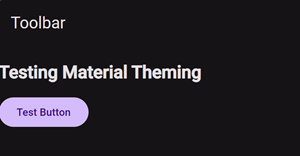
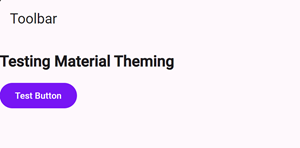
Theming Angular Material by just targeting CSS classes can be tempting, but can lead to issues later on when upgrading to a newer version due to class names or dom structure changes between versions.
We now have design tokens that are available from Angular Material to make theming components much easier and upgrade proof, and these tokens will be available in the documentation starting in version 19 (releasing on November 19, 2024)!
Although the tokens aren't available in the docs until v19, this code will work if you are using v18 of Angular.
You can currently see these tokens by switching the version of the Angular Material docs to v19 (next), or by visiting this url: https://next.material.angular.io.
Once on this version of the site, you can visit a component page (such as the Toolbar component), and click
on the new styling tab.

This page shows an example of how to override the tokens for the toolbar, as well as a list of all tokens supported
by toolbar-overrides.
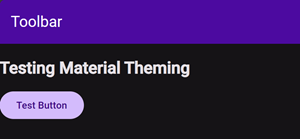
Here is an example of setting the toolbar to a color from our theme, and switching the text color within to always
be white (by default it will be white with a dark theme, but we also want to ensure that it is white against
the purple background even if we are using a light theme):
@use '@angular/material' as mat;

$my-custom-theme: mat.define-theme(
  (
    color: (
      theme-type: dark,
      primary: mat.$violet-palette,
      tertiary: mat.$orange-palette,
    ),
  )
);

:root {
  @include mat.toolbar-overrides((
    container-background-color: mat.get-theme-color($my-custom-theme, primary, 25),
    container-text-color: white,
  ))
}

html {
  @include mat.core-theme($my-custom-theme);
  @include mat.all-component-themes($my-custom-theme);
}
Check out all of the available styling tokens in the docs, and happy theming!